

How Do You Choose an Ophthalmic Instrument Table for Wheelchair Access?
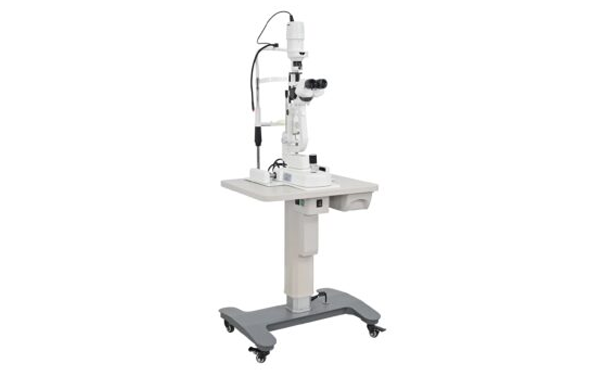
Does a motorized table automatically make an eye-examination setup wheelchair accessible?
No. Access depends on the selected table, instrument arrangement, wheelchair, controls, cables, room, and local requirements; verify that complete configuration before installation.
Start with the actual patient approach, equipment, and room conditions.
Why Is Height Adjustment Alone Not Enough for Wheelchair Access?
Height is important, but it is only one part of how a wheelchair user approaches, aligns with, and remains comfortable beside an instrument.
A table can move vertically and still create an obstruction through its base, controls, cables, instrument footprint, or limited approach space. Access must be tested as a complete patient-and-device arrangement.
Look below and around the tabletop
A user may need to approach from the front or side, align the wheelchair with the examination device, and keep the chair’s footrests, arm supports, and wheels clear. A wide or centrally placed base can block the approach even when the top reaches a useful height. A crossbar, cable loop, foot control, or power strip can also become an obstacle. Ask for drawings or photographs that show the table in its working configuration, not only a clean product image.
The instrument matters just as much. A chin rest, viewing head, joystick, or control panel may occupy the space where a patient’s knees or hands need to be. A table that accepts one device may behave differently when a second device is added. Confirm suitability against the specified equipment and approach direction.
| Access factor | What to observe | Evidence |
|---|---|---|
| Approach | Front, side, or both | Room plan and trial |
| Base | Knee, foot, and wheel clearance | Site measurement |
| Controls | Patient and operator reach | Demonstration notes |
Separate access from clinical positioning
Entry into the space is not the same as stable positioning for an examination. The patient may need to reach the instrument controls, maintain a comfortable posture, and exit without a rushed transfer. Ask who adjusts the table, who operates the device, and whether the patient remains in the wheelchair throughout the intended task. Consider communication and control reach as well as physical clearance.
Topcon’s ophthalmic instrument tables page is useful as an external example because it distinguishes adjustable, multi-device, and wheelchair-accessible table categories. Its descriptions and model specifications belong to Topcon products only; they are not Hongdee specifications or a universal standard.
Which Clearances, Loads, and Reach Requirements Need Measurement?
The right measurements come from the planned wheelchair, instruments, and examination movements—not from a single number copied from another table.
Measure approach space, knee and foot clearance, device envelope, working load, control reach, cable paths, and movement limits, then obtain written confirmation for the selected table and configuration.
Make a site measurement sheet
Begin with the room plan: door and corridor widths, turning area, wall positions, floor transitions, nearby furniture, and the direction from which a wheelchair will approach. Then record the wheelchair’s overall width, length, turning needs, footrest and armrest position, seat height, and any relevant user-specific features. Measurements should be taken with the chair in the condition used for the examination, not only with detachable parts removed.
Next, document the instrument envelope: footprint, height, controls, head position, chin or forehead support, cables, power connections, and any movement arc. Confirm the manufacturer’s stated working load for the actual configuration and distinguish static support from safe movement. Check the specified model’s documentation for every installed device.
Measure reach and movement, not just static gaps
Ask the team to map the motions required during the examination. Can a seated patient reach a relevant control? Can the clinician adjust the device without crossing the patient’s path? Does raising or lowering the table create a pinch point, cable tension, or collision with the wheelchair? Is there enough space to reposition without moving the patient unexpectedly?
A practical worksheet might look like this:
| Item | Record on site | Confirm in writing |
|---|---|---|
| Wheelchair approach | Front, side, or both | Intended access configuration |
| Knee and foot space | Actual chair and user position | Drawing or model-specific clearance |
| Device load and footprint | Each installed instrument | Approved load and mounting method |
| Control and cable reach | Normal examination movement | Cable, power, and control arrangement |
| Vertical travel | Lowest and highest working positions | Travel limits and installation conditions |
Also record the chair’s turning and stopping behaviour near the table. A clearance that looks adequate on a plan may be difficult to use when footrests, arm supports, or a caregiver are present. If the examination involves more than one patient position, repeat the measurements for each position and identify which assumptions depend on a particular wheelchair model or user preference.
How Can Buyers Test a Table with Their Actual Instruments and Wheelchairs?
A demonstration is valuable only when it reproduces the proposed installation rather than showing an empty table in an idealised room.
Bring the actual wheelchair, instruments, operators, and accessories to a documented trial; record successful movements and unresolved conflicts before approving the order.
Rehearse the full examination path
Invite the people who will use the room to test entry, alignment, examination, adjustment, and exit. Include the wheelchair user or a representative chair with the same relevant dimensions. Install or simulate every proposed instrument, including the power strip, foot control, keyboard, printer, and cable management. Test the table at its intended operating positions, not just at the lowest setting.
Observe whether the patient can approach without reversing into furniture, whether the instrument can be aligned without a forced transfer, and whether the operator can maintain a clear line of sight. Test both sides if the room may serve different layouts. A short video or annotated floor plan can support the review alongside supplier confirmation.
| Trial step | Record | Decision |
|---|---|---|
| Approach | Entry and alignment path | Pass or revise layout |
| Examination | Reach and visibility | Confirm or adjust |
| Exit | Clearance after use | Approve or resolve |
Turn observations into acceptance points
Write pass/fail or “requires confirmation” statements. Examples include: the planned wheelchair can reach the device without a transfer; the controls remain reachable; no cable tightens through the travel range; the table does not collide with the wall; and the installed load matches the approved configuration. Avoid describing the result as universally accessible when the test covered only one chair and one room.
The Hongdee Vision Ophthalmic Motorized Table page can support the product conversation. Send the actual instrument dimensions, weights, room sketch, wheelchair conditions, and desired access direction so the supplier can respond to the proposed setup rather than to a vague product name.
What Installation, Cleaning, and Service Requirements Should Be Documented?
Access can be lost after installation if the table is positioned incorrectly, cables are rerouted, or maintenance changes the working arrangement.
Document the approved layout, anchoring and power conditions, cleaning instructions, inspection responsibilities, and service route so accessibility remains part of the equipment handover.
Treat installation as part of the access test
The purchase file should identify the approved table model, instrument combination, mounting method, power requirements, control location, and room plan. Ask who is responsible for floor, wall, electrical, and network work, and which conditions must exist before delivery. If the final room differs from the demonstration, repeat the relevant clearance and movement checks.
| Handover item | Confirm | Record |
|---|---|---|
| Layout | Approved room arrangement | Final drawing |
| Installation | Base, controls, and cables | Installer record |
| Access | Actual wheelchair and device trial | Acceptance notes |
Use written approval for any change to the base, controls, cable routing, or mounting pattern. A local modification may affect movement, stability, cleaning, or service access. Request installation drawings and a final record of what was installed. Limit any accessibility statement to the evaluated configuration and applicable local requirements.
Keep routine care practical
Cleaning instructions should identify surfaces and controls that can be safely cleaned, products to avoid, and the procedure for isolating power when required. Use the specified model’s instructions and local infection-control policy. Staff should know how to report unusual noise, unstable movement, damaged cables, or a blocked travel path.
We ask for a service contact, replacement-part process, and escalation route for the selected configuration. Record who checks access again after equipment is moved or serviced, since a changed cable path or accessory can alter the approved arrangement. For a written review, use Hongdee Vision Contact Us and request confirmation of the selected model, proposed accessories, and site assumptions.
Conclusion
Choose accessibility through real measurements and a full demonstration. Height adjustment helps, but only the wheelchair, instruments, room, controls, cables, installation, and service plan together show whether a proposed setup fits.