

How Do You Choose a Trial Lens Set and Trial Frame That Work Together?
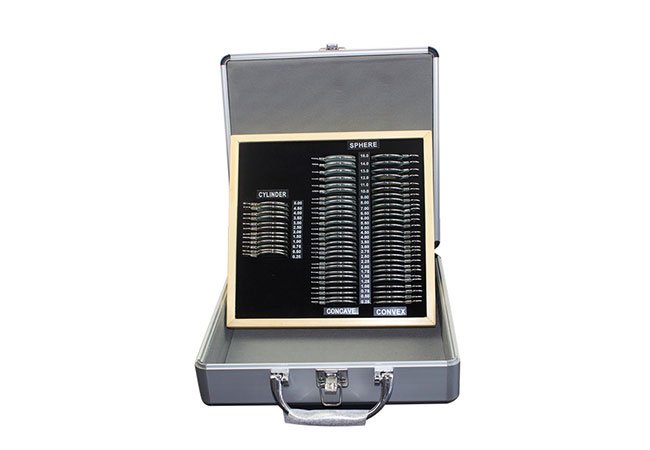
Choose the set and frame as one working system: lenses must be selectable, mountable, identifiable, and adjustable throughout the intended refraction workflow.
The best combination is not the largest set; it is the one whose lens interfaces, markings, fit controls, and replacement path match your clinicians’ actual work.
Use the following checks before comparing case size or component counts.
Which Lenses and Accessories Should a Working Trial Set Include?
Start with the measurements and handling sequence your clinicians actually perform, then specify the lens families, accessories, and case layout that support that sequence.
The right set is not necessarily the one with the largest lens count. It is the set whose powers, controls, markings, accessories, and presentation make the intended workflow clear and repeatable.
Build the list around the examination
Before comparing cases, write down the lens categories used in your routine. A working set may need spherical lenses, cylindrical lenses, cross-cylinder or other refinement accessories, prisms, occluders, filters, and auxiliary pieces. The exact selection depends on the examination method, practitioner preference, and the frame design. I would ask each intended user to mark which items are essential, occasional, or unnecessary rather than accepting a long standard list without review.
The physical lens is only one part of the decision. Check whether each lens has a readable power marking, a consistent orientation, and an aperture or mount that allows it to sit correctly in the frame. If cylindrical lenses require a visible axis reference, confirm how that reference is presented when the lens is rotated. If the workflow uses a particular accessory, verify that it can be placed without obscuring another lens or making the stack difficult to interpret.
Case organization matters as much as inventory. Lenses that are logically arranged and individually identifiable reduce selection errors during a busy examination. A rigid case, labelled positions, and a place for frequently used accessories can also make missing components easier to notice. These are workflow considerations, not promises of a clinical outcome.
The manufacturer’s trial lens set page and trial lens frame page are useful starting points for defining the product categories, but I would request the actual component list and frame interface before treating any set as complete.
| Area to check | Buyer question | Why it matters |
|---|---|---|
| Lens families | Which powers and accessory types are used in this workflow? | Prevents paying for an irrelevant inventory |
| Markings | Can users read power and orientation at the working distance? | Supports selection and verification |
| Aperture and mount | How does each lens sit in the intended frame? | Prevents unstable or ambiguous stacking |
| Case | Are components protected, labelled, and easy to audit? | Helps preserve a complete working set |
How Can Buyers Confirm Lens and Frame Compatibility?
Compatibility is a physical and operational question: the lens must fit the frame’s aperture or holder, remain oriented, and be usable alongside other selected lenses.
Ask for a live assembly demonstration with the exact lens set and frame, because a shared brand name or similar appearance does not prove interchangeable mounts, slots, or stacking behaviour.
Test the interface, not the label
I would ask the supplier to demonstrate representative lenses in every relevant position of the frame. Check insertion and removal, retention, rotation, axis visibility, and whether adjacent lenses remain readable. Try a realistic stack rather than a single lens: for example, combine the types your clinicians commonly use and observe whether the frame becomes crowded, unbalanced, or difficult to interpret. The test should include both the right and left sides if the frame is asymmetric or uses different controls.
Also examine how the lens is held. A lens that sits loosely can move during handling; one that is difficult to remove may slow the examination or invite force that could damage the holder. Confirm whether a lens requires an adapter, special orientation, or a position reserved for a particular accessory. Ask what happens if an individual lens is lost or damaged: can an equivalent component be ordered, and will it fit the original frame without replacing the whole set?
A written compatibility statement is helpful, but it should describe the relevant interface rather than simply say “compatible.” Record the frame model, aperture dimensions if supplied, mounting method, allowable positions, and any exclusions. If you are combining suppliers, request confirmation from both sides and test the combination before purchase. Never assume that a lens from another brand will fit because its outside diameter looks similar.
| Demonstration step | What to observe | Record |
|---|---|---|
| Single-lens insertion | Fit, retention, orientation | Position and any adapter |
| Rotation test | Smooth control and readable axis | Whether marking stays visible |
| Common stack | Clearance and balance | Which combinations are practical |
| Replacement check | Ordering path for one component | Part identification information |
Make acceptance observable
A short acceptance sheet is more useful than a general statement that the set “works.” Include photographs or diagrams supplied by the manufacturer where permitted, a list of tested combinations, and the names of staff who performed the demonstration. The goal is not to certify clinical accuracy. It is to make sure the purchased parts can be assembled and handled as proposed, with any limitations visible before the equipment enters routine use.
What Adjustments Matter for Patient Fit and Clinician Handling?
The frame should let the practitioner position lenses consistently while accommodating different faces, bridge shapes, and working preferences without confusing fit adjustment with measurement.
Prioritize stable positioning, clear controls, and a comfortable adjustment range; a frame that is difficult to fit can undermine an otherwise suitable lens inventory.
Check the fit from the operator’s side
During a demonstration, adjust the frame for several representative users or models, using the same sequence staff would use in practice. Observe bridge adjustment, temple adjustment, lens height, pantoscopic or vertical positioning controls where provided, and the ability to centre the frame without excessive pressure. The exact controls vary by design, so the supplier should explain their intended use rather than leaving staff to infer it from appearance.
A good handling test includes putting the frame on, making a small adjustment, removing it, and repeating the process. Look for controls that are easy to distinguish by touch and that do not move accidentally during ordinary handling. Check whether the clinician can see the lens markings while making changes and whether the frame remains balanced after several lenses are inserted. If the frame is intended for children or people with unusual facial dimensions, ask whether its adjustment range is suitable, but do not assume that a general-purpose frame meets every population’s needs.
Patient comfort also affects cooperation. Edges, nose contact, temple pressure, and frame weight should be considered in the context of the examination duration. I would document fit limitations honestly, especially where the frame is designed for a particular user group. Fit adjustment does not replace the practitioner’s own positioning and verification steps; it simply creates a more controllable platform for them.
| Fit or handling area | Practical demonstration | Procurement note |
|---|---|---|
| Bridge and nose support | Adjust and recheck position | Note usable range and stability |
| Lens height | Compare positions on different faces | Confirm control and scale |
| Temples | Open, fit, remove, and refit | Check pressure and accidental movement |
| Controls | Operate while viewing markings | Prefer clear, distinguishable controls |
Include staff language in training
Training should explain what each adjustment does, which controls must be locked or checked, and how to tell a fit problem from a missing or incorrectly oriented lens. Use the same terminology in the frame diagram, receiving checklist, and internal procedure. That consistency is particularly valuable when more than one clinician shares the set.
How Should a Practice Inspect, Store, and Replace Individual Components?
Treat the set as a maintained collection of identifiable components: inspect it after use, store it to prevent damage, and plan individual replacement before a missing lens disrupts the workflow.
A component-level inventory, gentle cleaning routine, protected storage, and documented replacement path usually matter more than adding seldom-used pieces.
Build a simple component-control routine
Assign the case a responsible location and use an inventory sheet that lists every lens and accessory by type, marking, and position. At the start or end of a session, staff can check for missing pieces, damaged surfaces, loose mounts, unreadable labels, and contamination. Cleaning instructions should follow the manufacturer’s guidance for the lens material, coatings, frame, and case. Avoid improvised solvents or abrasive materials when the supplier has not approved them.
Inspect markings under the same light in which the equipment is normally handled. A lens that is physically present but difficult to identify is not fully serviceable for a fast workflow. Check that cylindrical axes or other orientation references remain legible and that no lens is stored in a position that encourages scratching. Keep unused accessories in their assigned slots rather than placing them loose in the case.
Replacement planning should be specific. Record the component identifier, supplier contact, date requested, and whether a temporary substitute is allowed by your internal procedure. If an individual replacement is not available, ask whether a complete set or a compatible component from another line is the appropriate alternative. Do not substitute by visual similarity alone. The Hongdee Vision contact page can be used to request current component and support information before finalizing the purchase.
| Maintenance point | Routine | Escalate when |
|---|---|---|
| Inventory | Count and match marked positions | A component is missing or unidentified |
| Surface and mount | Inspect and clean as directed | Scratches, looseness, or damage appears |
| Storage | Return each part to its protected slot | Case closure or padding is compromised |
| Replacement | Keep identifiers and supplier route | One lens cannot be ordered individually |
Decide what “ready” means
Your internal ready-to-use definition might require a complete inventory, legible markings, clean surfaces, secure frame controls, and a documented replacement route. That definition is a quality-control tool, not a claim about diagnostic performance. If the practice is buying a second frame or a partial accessory kit, repeat the same inspection and compatibility check rather than assuming the original acceptance applies.
Conclusion
Choose the lens inventory, frame interface, fit controls, and maintenance plan together. A practical demonstration and component-level replacement route will protect daily handling better than a large but poorly matched set.