

LCD Vision Chart vs Chart Projector: What Should You Check Before Buying?
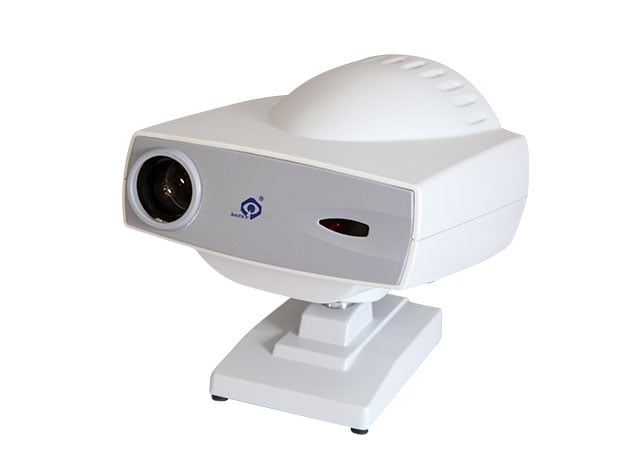
A chart can look sharp yet be unsuitable for the room's test setup. We check the viewing conditions before choosing a display technology.
When comparing an LCD vision chart with a chart projector, check the actual viewing distance, permitted layout, optotypes, controls, installation requirements, and verification method. We choose the documented system that fits the intended tests, not the display with the most impressive appearance.
A measured room plan turns a broad product comparison into an actionable enquiry. We use it to review the display path, required test functions, and the evidence needed at handover.
How Do LCD Charts and Projectors Differ in Everyday Use?
The difference is display and control, but both require a controlled environment and documented setup.
An LCD chart displays chart content directly, while a projector sends an image to a surface or screen; compare the complete room, control, scaling, and maintenance workflow for the exact model.
Compare the display path
An LCD vision chart uses a screen as the chart surface. The buyer should confirm how the device presents optotypes, symbols, letters, numbers, contrast options, masking, and other required functions. A chart projector creates an optical path from the projector to a wall, screen, or mirror arrangement. It therefore adds questions about throw distance, focus, projection surface, alignment, lamp or light-source maintenance, and room geometry. Neither description alone establishes clinical suitability.
The selected product may offer a particular library of charts, remote control, randomisation, or display adjustments. Those functions are model-specific. Ask to see the actual interface and the exact optotypes your practice uses. Check whether staff can change line, mask, direction, or chart without leaving the patient’s side, and whether the selected result can be recorded clearly. A large screen may be convenient in one room and produce reflections in another. A projector may fit a mirror layout well while requiring more careful installation and focus checks.
Hanson Instruments’ test-chart directory shows that suppliers may group LCD charts, vision charts, projectors, mirrors, and test types within the same refraction category (Hanson Instruments). That directory is useful evidence that the room solution includes more than the display head; it does not define universal distances, chart content, or installation instructions for another manufacturer’s product.
| Everyday question | LCD chart | Projector |
|---|---|---|
| Image location | On the device screen | On a wall or screen through optics |
| Room dependency | Screen position and reflections | Throw path, focus, surface, and mirror layout |
| Content control | Device interface or remote | Projector control or remote |
| Maintenance focus | Screen, controls, and software if applicable | Optics, light source, focus, and alignment |
| Key verification | Scaling and readability | Projection geometry and image sharpness |
Consider the staff and patient experience
Run the same acuity workflow on each option. Check chart selection, occlusion or masking, reset behaviour, remote access, glare, and patient alignment.
How Should Buyers Check Viewing Distance and Room Conditions?
Measure viewing distance for the selected device and room; do not assume a universal value.
Confirm the manufacturer’s permitted distance, scaling, mirror arrangement, illumination, glare control, and patient position in a live room check before ordering.
Measure the actual geometry
Draw the room plan with the patient’s eye position, chair movement, chart or projector location, walls, mirrors, doors, windows, and operator station. Measure the available distance and identify whether the patient can remain aligned at the intended position. For a projector, record the projection path and any mirror angles, bracket positions, focus range, and clearances. For an LCD chart, measure the screen mounting height, viewing angle, and distance from the patient’s expected eye position.
Do not set a universal distance simply because a number appears in an online listing. The correct setup depends on the selected device, chart scaling, optotype size, and manufacturer instructions. Ask the supplier to state the supported distances and how the system maintains or verifies scale. If mirrors are permitted or required, confirm their size, adjustment range, placement, and wall strength. A projector that cannot be aligned in the room should not be accepted merely because the display works on a supplier’s bench.
Lighting needs a similar test. Check windows, overhead fixtures, reflective surfaces, dimming controls, and the contrast between the chart and surrounding walls. The objective is not to claim a universal brightness level; it is to create the operating environment specified for the selected product and the practice’s procedure. Record what changes are needed before installation.
| Room check | What to measure | What to document |
|---|---|---|
| Eye position | Patient’s actual seated location | Marked floor or chair range |
| Chart path | Direct screen or projection route | Dimensions and obstructions |
| Mirrors | Location, angle, and adjustment | Layout and bracket details |
| Lighting | Glare sources and controllable fixtures | Room preparation steps |
| Scale | Device-specific chart sizing method | Manual reference and acceptance test |
Test the room before committing to a layout
Use a temporary mock-up or supplier demonstration where possible. Check sightlines, mobility access, door clearance, cleaning access, and whether the patient’s eye position shifts when the chair is adjusted. Confirm the revised plan in writing.
Which Optotypes and Test Functions Does the Practice Actually Need?
Select content from practice tasks and verify the quoted device presents it at the required scale.
List required optotypes, acuity formats, masking, contrast or colour functions, randomisation, and controls; do not mistake a generic display for a validated visual-acuity chart.
Build a task-based chart list
Start with the tests routinely performed by the practice and the populations served. The list may include letters, numbers, directional symbols, children’s symbols, contrast tasks, or other optotypes, but the exact selection should come from the responsible clinical team and local requirements. Ask which charts need randomisation, line selection, crowding or masking, binocular presentation, or separate right- and left-eye controls. Avoid buying functions that look impressive but will not be used or understood by staff.
For each required function, ask the supplier to demonstrate the content on the quoted model. Check the label, orientation, line progression, symbol clarity, and reset behaviour. Confirm whether the chart is built into the device, supplied as software, or dependent on an external computer or remote. If updates are possible, ask how they are authorised and documented. These questions do not require us to claim that one display technology is clinically superior; they establish whether the selected unit can support the intended task.
| Content requirement | Buyer test | Acceptance note |
|---|---|---|
| Optotypes | Show every required symbol or character | Name and version |
| Scaling | Change line or size as intended | Device method and room distance |
| Controls | Select, mask, randomise, and reset | Operator steps |
| Patient groups | Test relevant adult and child formats | Approved use cases |
| Records | Identify selected line and task | Documentation method |
Keep chart content and procedure connected
Staff still need to position the patient, explain the task, control occlusion, and record results. Check display locking, remote pairing, test-type changes, navigation, and cleaning instructions. Ask two operators to reproduce the same chart selection and record the exact mode, line, and reset state so the procedure remains understandable during handover. If a child or low-vision format is required, have the responsible team verify its symbols and controls on the quoted device rather than relying on a product-family description. Record the fallback when a remote or display control is unavailable.
What Installation and Verification Steps Should the Supplier Document?
Installation should provide a reproducible setup, tested scale, instructions, and service route.
Require a signed installation and acceptance record covering geometry, image quality, controls, content, cleaning, power, training, and the procedure for reporting drift or faults.
Define installation deliverables
Before delivery, ask for the installation drawing, mounting requirements, power specification, cable plan, room conditions, permitted mirror arrangement, and service access. Confirm who is responsible for wall reinforcement, electrical work, network access, disposal of packaging, and final alignment. A supplier should state whether the device requires a trained installer and what evidence will be provided after setup.
At installation, verify the serial number, model, accessories, control devices, manuals, software or content package, and physical condition. Check that the chart or projector is mounted at the agreed position and that the patient’s eye location is marked or otherwise reproducible. For a projector, inspect focus, alignment, image edges, mirror movement, and surface condition. For an LCD chart, inspect screen uniformity, brightness controls, content navigation, reflections, and mounting stability.
Complete the practice’s chart list and room test with the responsible operator. Measure or confirm the viewing distance and scaling method defined by the device manual. Record the test conditions, including room lighting and patient position. If the supplier says a value is within tolerance, ask where that tolerance is defined rather than copying an unsupported number into the acceptance form.
| Installation stage | Evidence required | Responsible party |
|---|---|---|
| Room preparation | Completed plan and utilities | Site or facilities lead |
| Mounting | Position, stability, and access check | Installer and buyer |
| Display | Focus, scale, readability, and glare review | Supplier and clinical lead |
| Controls | Required charts and reset behaviour | Trained operator |
| Handover | Manuals, training, service contacts, signed record | Buyer and supplier |
Plan ongoing verification and service
Create a local check routine for chart content, control response, mounting, focus or screen condition, and room geometry. The frequency should follow the manufacturer’s instructions and the practice’s quality system rather than an invented universal schedule. Keep a log of cleaning, faults, room changes, service visits, and any reason the chart was removed from use.
Train staff to report a blurred, distorted, unexpectedly scaled, or intermittently controlled display. They should not compensate by moving the patient or changing room distance without documenting the change. If a projector’s mirror is moved or an LCD chart is remounted, repeat the installation verification. A small change in geometry can affect the procedure even if the equipment still powers on.
For a Hongdee configuration discussion, buyers can review the vision chart range, compare the chart projector options, and use the contact page to send a room plan and required chart list. Ask for model-specific viewing-distance, scaling, mirror, control, and installation instructions. Do not assume that every LCD chart or projector supports the same room arrangement.
Conclusion
Choose an LCD chart or projector by testing the actual room, distance, scale, optotypes, controls, installation, and service process. The display technology matters, but documented geometry and verification determine whether the setup is usable.