

What Should Buyers Check When Choosing an Automatic Lensmeter for Progressive Lenses?
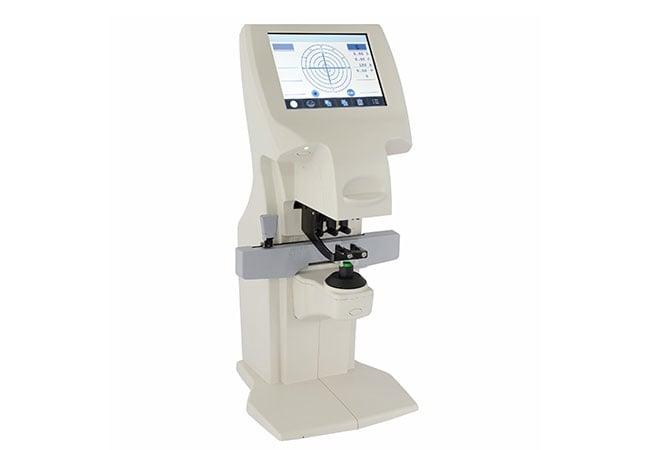
A clear digital reading is not enough if the lens is positioned at the wrong reference point. We evaluate the operator's complete verification process.
When choosing an automatic lensmeter for progressive lenses, check supported measurement modes, positioning aids, reference-point handling, repeatability, records, and training. We use representative lens designs in the demonstration rather than treating automatic identification as a substitute for correct technique.
Our purchasing approach follows the lens from identification to documented acceptance. This gives distributors and optical retailers a way to compare devices through tasks staff will actually perform.
How Does Progressive Lens Verification Change the Lensmeter Workflow?
Identify the lens design and references before measuring the powers that matter.
Progressive lenses require deliberate identification and positioning: verify reference points, distance power, near addition, cylinder data, and prism as applicable instead of accepting the first automatic reading.
Start with the lens, not the button
A progressive lens is not verified in exactly the same way as a simple single-vision lens. The operator must understand which reference points or manufacturer marks guide the distance and near measurements. Some lenses have visible engravings, temporary layout marks, or a manufacturer’s design identifier; others may require a documented positioning method. The workflow should therefore begin with inspection, cleaning, mark recognition, and orientation before the instrument’s measurement mode is selected.
The purpose is not to assume that every progressive lens uses the same layout. Ask the supplier to demonstrate several representative designs actually encountered by the practice, including lenses with different corridor lengths, treatments, powers, and marking visibility. Record how the operator locates the distance reference and near reference, how the lens is held or supported, and how the device indicates that the target is centred. If the device offers automatic progressive identification, test when it succeeds, when it asks for manual input, and how the operator confirms the result.
A digital lensmeter may report sphere, cylinder, axis, addition, prism, or other values depending on its configuration. These readings are verification data for the lens, not a complete assessment of how the finished eyewear sits on a wearer’s face. In particular, lens verification should not be confused with every on-face fitting parameter. Fitting height, pantoscopic angle, vertex distance, wrap, and wearer alignment may require separate procedures and tools.
| Workflow stage | Operator question | Evidence to capture |
|---|---|---|
| Inspect | Are marks, orientation, and lens surface clear? | Design and marking notes |
| Locate | Where are distance and near reference points? | Marking or layout record |
| Measure | Which mode and target are being used? | Screen or printout |
| Confirm | Was the reading repeated or checked manually? | Repeat record |
| Report | Which values belong in the job file? | Completed verification form |
Build verification around real job types
List the progressive lenses most often received, including different marks and unusual designs, and use them as the demonstration set. If operators choose different reference points or produce different additions, resolve the training or workflow ambiguity before purchase.
Which Measurement Modes and Positioning Aids Should Buyers Request?
Compare required modes and aids that help operators place each lens repeatably.
Request the exact measurement modes, target guidance, lens support, marking tools, display prompts, and output options included with the quoted model; PD or UV functions are model-specific.
Compare the controls that shape operator behaviour
During a demonstration, ask the operator to measure a progressive lens from start to finish without coaching. Watch how the device communicates target location, axis orientation, prism reference, and near-add measurement. Is the display readable from the normal working position? Does the device show a clear indication when the lens is not centred? Can the operator switch between right and left lenses without losing the record? Can a result be repeated without overwriting the original information?
Features such as PD measurement, UV measurement, barcode input, printing, memory, or network output should be treated as separate procurement decisions. The OphthalmologyWeb automatic lensmeter directory illustrates why this matters: listings present different combinations of sphere, cylinder, axis, prism, addition, UV, PD, display, and power information across products, with some fields marked “inquire” (comparison directory). That directory is useful for framing questions, not for assuming any current Hongdee specification or availability.
| Feature | Demonstration request | Why it matters |
|---|---|---|
| Progressive mode | Identify and measure distance and near references | Tests the complete workflow |
| Positioning aid | Deliberately move off target, then recapture | Shows error visibility |
| Prism handling | Use the practice’s required reference convention | Avoids inconsistent records |
| Output | Print or transfer a sample job record | Tests documentation |
| Optional functions | Confirm PD, UV, memory, or connectivity separately | Prevents feature assumptions |
Test physical fit and maintenance access
Check the instrument footprint, viewing angle, lens support, cleaning access, cable route, and placement at the workbench. Record included and optional accessories. Ask an operator to place both an uncut lens and a mounted lens, where the shop handles both, and explain how the support keeps the target stable. Note whether frame rims or lens edges obstruct the measurement area. A live check should also cover how the operator cleans the support between jobs and where the job identifier is recorded. These details connect physical design with the repeatability required for progressive verification, without assuming that every lensmeter offers the same aids.
How Can a Demonstration Test Consistency Across Different Lens Types?
Show whether trained operators can repeat the process across representative lenses and explain exceptions.
Use a blinded or shuffled sample set, repeat measurements, and compare the complete records; consistency means transparent handling of variation, not identical numbers from one easy lens.
Prepare a controlled sample set
Select samples from actual order categories, subject to your organization’s handling and privacy rules. Remove clues that would make the operator follow a memorized sequence, or have the supplier randomize the order. Include lenses with clear and less visible reference marks, different additions, varied treatments, and any frame conditions that the shop commonly encounters. Keep a sample log with a neutral identifier and the values already verified by the clinic’s established process, but do not turn that log into an unsupported accuracy claim.
Have at least two operators perform the measurement sequence. Each should record lens orientation, selected mode, reference point, displayed values, repeat status, warnings, and any reason for manual intervention. Then ask them to measure selected samples again after removing and replacing the lens. The exercise reveals whether the device gives useful positioning feedback and whether staff know when an automatic result needs confirmation.
The goal is not to publish an accuracy percentage from a small buyer demonstration. It is to discover workflow variation and agree on acceptance criteria. If the device identifies a progressive design automatically, ask the supplier to explain the identification basis and how staff should proceed when marks are missing or the algorithm cannot identify the design. A transparent fallback procedure is more valuable than a promise that every lens will be recognised.
| Test dimension | Sample variation | Record |
|---|---|---|
| Mark visibility | Clear, faint, or temporarily marked | How the reference was located |
| Lens design | Different corridor or addition groups | Mode and target used |
| Surface | Clear, tinted, or coated as relevant | Capture warnings |
| Operator | Two or more trained users | Sequence differences |
| Repeatability | Remove and replace selected lenses | Re-measurement notes |
Evaluate exceptions as part of quality control
Ask what happens when the lens cannot be centred, the target is outside the supported area, the printout is unclear, or values change after repositioning. A good system does not need to hide these cases; it should help the operator notice and resolve them. The supplier should show the correct manual method and the documentation expected when a result is confirmed by another instrument or a qualified reviewer.
After the demonstration, compare the logs for missing fields and inconsistent terminology. If one operator records “near add” while another records a different value without explaining the reference, the training plan needs revision. We should also check whether the lensmeter’s output can be linked to the job number without creating transcription errors. Workflow consistency is a shared responsibility between device design, training, and local procedures.
What Should a Lensmeter Training and Acceptance Checklist Include?
Prove that the quoted device, accessories, documents, and staff procedure work together.
Require model-specific training, progressive-lens practice, exception handling, cleaning guidance, and a signed acceptance test based on your actual jobs—not only a supplier’s standard presentation.
Specify the handover before ordering
Request a written handover plan covering installation, training, manuals, accessories, warranty terms, service contacts, and escalation. Ask who trains new staff and whether refresher guidance is available. Distributors should clarify regional support and spare-part routes.
A useful training session includes lens inspection, marking recognition, distance and near reference location, mode selection, positioning aids, prism conventions, repeat measurement, output handling, and the limits of automatic identification. It should include a lens that does not behave perfectly so staff learn the fallback procedure. Make clear that automatic identification is an aid, not a substitute for understanding progressive designs or checking the job record.
Acceptance should use the same sample set agreed during procurement. Verify the serial number and configuration, physical condition, power compatibility, included accessories, display, printing or transfer, and any optional functions that were priced. Have the trained operator complete the agreed workflow and sign the result. If a requested function is unavailable, record it as a known boundary rather than allowing an informal promise to remain unresolved.
| Acceptance area | Pass evidence | If incomplete |
|---|---|---|
| Configuration | Model, accessories, and documents match order | Hold acceptance for correction |
| Workflow | Operators complete progressive sample set | Schedule targeted retraining |
| Output | Required values print or transfer correctly | Define manual fallback |
| Exceptions | Staff follow documented recovery steps | Record open limitation |
| Service | Contacts and warranty terms received | Escalate before sign-off |
Create a local quality routine
After delivery, keep a simple log of difficult lenses, repeat measurements, operator questions, cleaning, and service events. Review it during onboarding and when the workflow changes. If a new lens design creates uncertainty, pause and consult the lens documentation or supplier rather than treating an unexplained reading as confirmed.
For a current configuration and workflow discussion, buyers can review Hongdee’s automatic lensmeter page, compare it with the manual lensmeter range when a manual fallback matters, and use the Hongdee contact page to request model-specific answers. Do not assume PD or UV capabilities without confirmation in the quotation.
Conclusion
Choose an automatic lensmeter by testing representative progressive designs, operator positioning, repeatability, output, training, and service. Automatic identification can support the workflow, but it cannot replace lens knowledge, verification discipline, or a documented acceptance process.