

How Should You Match an Ophthalmic Chair and Doctor Stool to Your Examination Setup?
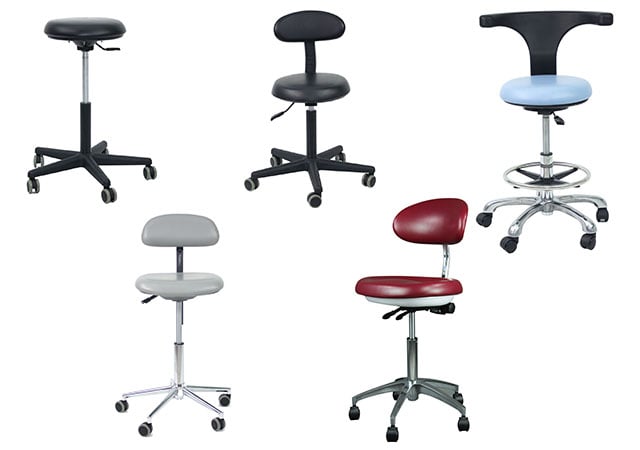
How should a patient chair and doctor stool work together at an eye-examination station?
Match both seats to the instrument, users, patient movement, controls, cables, and room; confirm the pairing through a task-based demonstration rather than isolated furniture specifications.
Begin with fixed instrument positions, then test both seats through the complete examination sequence.
How Do Patient and Examiner Seating Affect Access to the Instrument?
The key question is whether both seats help the patient and clinician reach the device without forcing the room to compensate for a poor fit.
Patient seating should support stable, adjustable positioning, while the doctor stool should let the clinician work near the instrument with suitable support and clear access to controls.
Start with the fixed points
Map the instrument’s optical or examination position, patient interface, clinician controls, foot control, and cable path. Some equipment is largely fixed, so the furniture must help users approach the correct position without awkward detours. A chair that moves independently may allow the patient to be aligned while the clinician remains in a preferred position, but the exact movement and range must be confirmed for the selected model.
The patient’s route matters too. Consider entry, transfer if one is required, adjustment, examination, and exit. A patient chair should not block a wheelchair path, door, or service space. Ask whether the patient remains seated between tasks or needs to move to another device. These are workflow decisions, not claims that one chair suits every clinic.
Set the clinician’s station deliberately
The doctor’s stool should place the clinician close enough to the instrument to operate it without leaning across the patient or reaching beyond the normal working area. Seat height, foot support, back or pelvic support if provided, base footprint, and mobility should be considered together. A rolling base can improve repositioning in one room and create an unwanted movement risk in another; test it rather than assuming.
The VELA discussion of chairs for ophthalmic equipment is a useful external ergonomics reference. It emphasises adjustable equipment, patient positioning, and dynamic use. Apply those principles to the specified model only after checking its product documents.
| Seating point | What to test | Evidence |
|---|---|---|
| Patient access | Entry, alignment, exit | Room trial |
| Clinician reach | Controls and line of sight | User observation |
| Movement | Chair, stool, and cable path | Layout record |
Which Adjustment and Support Features Should Buyers Test?
A useful feature is one that the intended users can adjust safely and repeatedly during the actual examination sequence.
Test seat height, patient positioning, support, movement, controls, and adjustment effort with the real instrument and representative users; compare practical use rather than a catalogue count.
Test patient-chair adjustments
Check how the chair changes height or position, how the control is reached, whether movement is smooth, and whether the user can understand the control without searching. Confirm the supported patient orientation, head or body positioning requirements, and whether the chair remains stable through the adjustment. If the chair is intended to work with multiple instruments, repeat the test at each relevant station.
| Adjustment | Demonstration question | Record |
|---|---|---|
| Height or position | Is movement smooth and reachable? | User notes |
| Patient support | Does alignment remain stable? | Trial result |
| Control | Who operates it and when? | Workflow note |
We compare the selected model’s documented capacity, adjustment range, electrical requirements, and operating instructions against the actual users and instruments. A preferred setting should remain a recorded demonstration result, not a universal rule for every workstation. If the page does not state a value, mark it for written confirmation. Ask how the chair behaves during a power interruption if it is motorized, and who is responsible for installation and service.
Test the doctor stool as part of the movement
Try the stool at each clinician workstation. Check whether the seat height permits a neutral working position, whether the base collides with the patient chair or table, and whether the stool can be repositioned without pulling cables. If support is offered, test whether it helps the user remain stable while operating fine controls; do not describe that observation as proof of injury prevention.
A small comparison table keeps the demonstration grounded:
| Feature to test | Observation | Confirmation needed |
|---|---|---|
| Patient adjustment | Who adjusts it and how? | Model instructions and limits |
| Clinician seat height | Does it fit the instrument task? | Selected-stool range |
| Base and movement | Any collision or cable issue? | Room layout and service access |
| Support surfaces | Stable and cleanable? | Upholstery and care documents |
| Multiple users | Can settings be changed easily? | Training and workflow plan |
How Can a Demonstration Reveal Awkward Reach and Positioning Problems?
A demonstration should reproduce the work, not merely show that every component can be moved once.
Use a scripted sequence with representative users, patient seating, instrument controls, and room constraints; record awkward reach, forced posture, collisions, and adjustment delays as purchase risks.
Script the examination sequence
Ask a clinician and support staff member to complete the ordinary steps: prepare the station, seat or align the patient, adjust the patient chair, operate the instrument, change the doctor stool, use any foot control, document the result, and reset the room. Include a second user with a different body size or preferred posture where possible. The goal is to expose adjustment conflicts, not to rank people’s bodies.
Observe whether hands remain near the working area, whether the clinician must twist to see a display, whether the patient’s head position is stable, and whether a control is hidden by the chair or table. Check cable slack throughout movement. Repeat the sequence for the instruments the practice intends to use; a comfortable slit-lamp station does not automatically suit an OCT or fundus camera.
| Task | Observation | Decision |
|---|---|---|
| Positioning | Patient and instrument align | Keep or revise |
| Controls | Reach and visibility | Confirm or adjust |
| Reset | Room returns to working state | Approve or resolve |
Record practical evidence
Use notes or an annotated floor plan to record what was tested, by whom, with which equipment, and under what room conditions. Separate direct observation from interpretation. “Stool base touched table during rotation” is more useful than “poor ergonomics.” “Patient chair control was reachable only from the operator side” leads to a concrete workflow decision.
The findings may support one setup, an accessory, a different room layout, or a request for a model-specific modification. They should not become a claim that the furniture prevents pain, eliminates risk, or ensures better clinical results. Where an external ergonomics source makes health claims, check the original study and local occupational guidance before using those claims in a purchase document.
Repeat the sequence after small layout changes, such as moving a monitor, foot control, or cable bundle. A setup that feels acceptable during a short demonstration may become awkward when staff reset the room repeatedly. Record which observations apply to a particular user, instrument, or room; do not present one demonstration as universal evidence for every clinic.
What Cleaning, Upholstery, and Service Factors Affect Long-Term Use?
Furniture is handled repeatedly and may need cleaning between patients, so care and service should be considered before the quote is approved.
Request model-specific cleaning instructions, upholstery information, electrical and mechanical service details, and replacement routes; choose materials and support based on the clinic’s actual routine.
Ask how the surfaces are maintained
Identify which surfaces contact patients, which controls are touched by staff, and which seams or moving areas may collect debris. Request the approved cleaning method and products for the selected upholstery and controls. Local infection-control policy and the model instructions should govern the routine.
| Care point | Buyer question | Record |
|---|---|---|
| Upholstery | Which products are approved? | Care document |
| Controls | How are they isolated and cleaned? | Instructions |
| Seams and movement | Which areas need inspection? | Staff checklist |
A practical demonstration can include wiping the chair’s accessible surfaces, checking whether controls remain readable, and inspecting gaps that are difficult to reach. This is an observation of workflow, not proof that the furniture is compatible with every cleaning policy. Record any limits, drying requirements, or materials that need special handling.
Plan service around the working station
Ask who installs the chair and stool, what power conditions apply to motorized furniture, which parts are replaceable, and how a fault is reported. Confirm warranty scope, service availability, and model specifications for the intended market in writing. We also identify who checks the complete station after a chair, caster, control, or support component is replaced. The service record should preserve the approved pairing rather than treating each piece of furniture as unrelated equipment.
For a coordinated request, start with the Hongdee Vision Ophthalmic Chair page and the Hongdee Vision Doctor Stool page, then use Contact Us to provide the instrument, room layout, user needs, and cleaning requirements. Ask for a proposed pairing and clearly marked assumptions, keeping the enquiry to equipment and workflow details.
Conclusion
Match the chair and stool through a complete demonstration. Patient alignment, clinician support, instrument reach, room movement, cleaning, and service all matter more than isolated furniture labels.