

What Should Optical Retailers Look for in a Digital PD Meter?
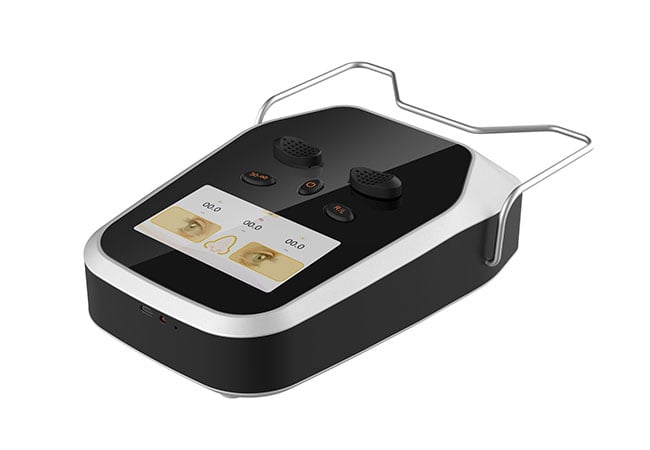
Define the measurements your dispensing workflow requires before comparing digital PD meters, then test alignment, repeatability, records, and training in context.
Choose the meter whose stated outputs and operating steps match your orders; a bright digital display alone does not establish measurement quality or fitting completeness.
Use the following checks to connect device features with the shop’s actual dispensing handoff.
Which PD Measurements Does Your Dispensing Workflow Require?
Begin with the prescription and frame-selection tasks your team actually performs, because “PD” can describe several related outputs and not every device supports every workflow.
Decide whether you need binocular distance PD, monocular distance PD, near measurements, or a defined combination; request each output explicitly in the demonstration.
Translate dispensing tasks into outputs
A buyer’s first task is to distinguish the measurement required by the order from the measurement that a particular instrument happens to advertise. If staff routinely dispense frames that require left and right positioning information, ask whether the meter reports monocular values separately and how the reference is established. If the workflow uses binocular PD, confirm whether the device displays the combined result, the component values, or both. For near work, ask how near measurement is selected and displayed, and what operator steps are required.
Write the desired output on the purchase brief in plain language. Include units, display format, whether results can be recorded or transferred, and whether the instrument has a defined mode for the use case. Do not add measurements merely because a menu contains them. Extra modes can create confusion if staff cannot explain when each is appropriate.
I would also ask where measurement fits in the dispensing sequence. A PD meter may support pupillary-distance collection, but it does not automatically determine every fitting parameter for a chosen frame. The frame, prescription, wearer posture, lens design, and practice procedure may require separate decisions. Hongdee Vision’s PD meter page is a useful product starting point; the supplier should provide the current operating details for the exact model under consideration.
| Workflow need | Question to ask | Keep separate |
|---|---|---|
| Binocular distance PD | Is one combined value, two values, or both shown? | Other fitting measurements |
| Monocular distance PD | Are right and left outputs clearly identified? | Assumptions about symmetry |
| Near measurement | What mode and operator steps are used? | Unspecified working-distance assumptions |
| Recordkeeping | Can staff transcribe or export results reliably? | Clinical interpretation |
Define the handoff
A useful specification also describes how the result moves into the order. If staff read the display manually, define the transcription check. If a connection or export is proposed, test it with the actual point-of-sale or dispensing system rather than assuming compatibility. The objective is a clear measurement handoff, not an implied guarantee that the device alone completes a fitting.
How Should Buyers Evaluate Alignment, Readability, and Repeatability?
The demonstration should show whether different trained operators can align the device, read the result, and repeat the process using the same documented steps.
Assess the complete interaction—head position, fixation, alignment cues, display, and repeat checks—because display resolution alone does not establish accuracy or suitability.
Make alignment observable
Ask the demonstrator to explain the alignment cues and the operator’s role. Depending on the device, these may involve patient posture, fixation, bridge placement, a target, or visible indicators. We should not infer a universal alignment method from the word “digital.” Have staff perform the measurement themselves after a short explanation, then record where they hesitate or interpret a cue differently.
Check the instrument on people with varied bridge shapes, facial proportions, and cooperation levels relevant to the shop’s customer base. This is a workflow test, not a clinical performance study. Observe whether the device remains stable, whether the customer can maintain the requested fixation, and whether staff can see the display without breaking the interaction. Ask what the device does when alignment is incomplete: does it signal a problem, require a restart, or simply show a value? The answer should be documented in training material.
Readability includes character size, contrast, units, left-right labels, mode indication, and the ease of recognizing a completed result. A clear display can reduce transcription mistakes, but it should not be described as evidence of measurement accuracy. Repeatability means staff can follow the same process and obtain outputs that are sufficiently consistent for the practice’s documented acceptance process. Any numerical tolerance used by a practice should come from its own policy or the manufacturer’s verified specification, not from an invented general rule.
| Demonstration item | What to observe | Evidence to retain |
|---|---|---|
| Alignment cue | Can a new operator explain and use it? | Written steps and staff notes |
| Display | Are mode, units, and sides unambiguous? | Screen record or checklist |
| Repetition | Can the same workflow be repeated? | Dated test records |
| Recovery | What happens after a failed attempt? | Restart and escalation steps |
Test more than one operator
A single successful demonstration can hide a training dependency. Ask at least the intended operator group to perform the sequence, using the same instruction. Compare not only values but also completion, hesitation, and data entry. If results differ, first investigate posture, fixation, mode selection, and transcription before attributing the difference to the instrument. A supplier should be able to explain setup and service pathways for the exact model without promising clinical outcomes.
What Can a PD Meter Measure, and What Still Needs a Separate Fitting Step?
A PD meter can support pupillary-distance measurement within its stated modes, but a dispensing team still needs a separate process for frame fit, fitting height, and order verification.
Do not treat a PD result as a complete on-face fitting record. Confirm the remaining parameters and decisions through the shop’s frame-specific dispensing procedure.
Keep the measurement boundary clear
Pupillary distance describes the relationship between the pupils for a selected viewing condition. A finished eyewear order may depend on additional information: frame dimensions, bridge and temple fit, lens shape, fitting height, pantoscopic position, wrap, vertex considerations, and the requirements of the lens design. Which items apply depends on the product and dispensing process. The instrument should not be credited with measuring a parameter it does not explicitly report.
This distinction should appear in staff scripts and order forms. A colleague may say “the PD is done” when they mean the device produced a reading. The order workflow should instead show which fields were measured, which were selected from the frame, and which require manual verification. That makes the boundary visible to staff and helps prevent a single device from becoming an unexamined substitute for a complete fitting check.
I would ask the supplier to map every displayed output to a definition and an operating mode. Ask whether distance and near values use different instructions, whether monocular values have explicit right and left labels, and whether the result is intended for a particular dispensing context. If documentation is unclear, pause the purchase rather than filling the gap with assumptions. For support and current model information, use Hongdee Vision’s contact page.
| PD meter output | It may support | It does not automatically establish |
|---|---|---|
| Binocular PD | A combined pupil-distance field | Frame-specific centration |
| Monocular PD | Right/left order entries | Fitting height or lens shape data |
| Near mode | A near-condition measurement | Every occupational or reading requirement |
| Digital display | Legible result review | Accuracy without documented validation |
Build an order cross-check
Before finalizing an order, staff can compare the displayed result with the selected mode, customer record, frame information, and any separate fitting fields. This is a process safeguard, not a universal clinical protocol. The buyer’s aim is to make the device’s contribution precise and prevent overclaiming what it can measure.
What Demonstration and Staff Training Should Come with the Device?
Require model-specific setup, operator practice, cleaning and storage guidance, troubleshooting, recordkeeping instructions, and a clear path for technical support.
Training should prove that staff can use the intended modes, recognize incomplete alignment, record outputs correctly, and escalate questions about readings or equipment behaviour.
Turn the demo into a handover
A proper demonstration should cover unpacking, power and environment requirements, patient positioning, mode selection, alignment cues, display interpretation, repeat attempts, and shutdown. Ask the supplier to show a normal completion and a deliberately incomplete attempt so staff learn how the instrument signals or handles uncertainty. If the shop uses paper or software records, rehearse the handoff with a real blank order form or test environment.
Training should include a short competency checklist. Staff can explain the difference between binocular and monocular outputs, identify distance versus near mode, locate right and left labels, and state which fitting fields remain separate. They should also know when not to proceed: an unclear display, unstable positioning, an unexpected mode, or a customer unable to follow the fixation instruction may require a repeat, an alternate procedure, or referral to the responsible professional under the shop’s policy.
Maintenance instructions should be practical. Document approved cleaning, safe storage, inspection of the display and alignment components, and the contact route for faults. Record the model and serial information as part of the asset file. Do not accept generic training material when the installed model has different controls or outputs.
| Handover area | Minimum evidence | Owner |
|---|---|---|
| Operating modes | Model-specific quick guide | Supplier and trainer |
| Staff use | Completed practice checklist | Shop manager |
| Data handoff | Test order or record | Dispensing lead |
| Support | Contact and escalation route | Purchaser |
Review after launch
After staff begin using the meter, collect questions and near-misses in a controlled log. Review whether errors arise from alignment, mode selection, transcription, or fitting boundaries. That feedback can improve the shop’s procedure without turning the device into a promise of accuracy or a replacement for professional judgement.
Conclusion
Choose a digital PD meter by required outputs, alignment workflow, repeatability checks, and training boundaries. A clear handoff shows what the instrument measures—and what the dispensing team must still verify separately.